

| I l@ve RuBoard |
|
4.5 Implementing Your Own IconsHere's a class that implements the Icon interface and uses ovals as simple icons: // OvalIcon.java
//
import javax.swing.*;
import java.awt.*;
// A simple icon implementation that draws ovals
public class OvalIcon implements Icon {
private int width, height;
public OvalIcon(int w, int h) {
width = w;
height = h;
}
public void paintIcon(Component c, Graphics g, int x, int y) {
g.drawOval(x, y, width-1, height-1);
}
public int getIconWidth( ) { return width; }
public int getIconHeight( ) { return height; }
}
A simple class that creates a few labels shows how it works: // TestOval.java
//
import javax.swing.*;
import java.awt.*;
public class TestOval {
public static void main(String[] args) {
JFrame f = new JFrame( );
f.setDefaultCloseOperation(JFrame.EXIT_ON_CLOSE);
JLabel label1 = new JLabel(new OvalIcon(20,50));
JLabel label2 = new JLabel(new OvalIcon(50,20));
JLabel label3 = new JLabel("Round!", new OvalIcon(60,60), SwingConstants.CENTER);
label3.setHorizontalTextPosition(SwingConstants.CENTER);
Container c = f.getContentPane( );
c.setLayout(new FlowLayout( ));
c.add(label1);
c.add(label2);
c.add(label3);
f.pack( );
f.setVisible(true);
}
}
Running this test program produces the display shown in Figure 4-7. Figure 4-7. OvalIcon labels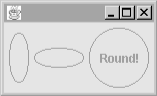 |
| I l@ve RuBoard |
|